PHP Web Features
Creating a Secure File Download Mechanism using PHP header() function
ওয়েব ডেভেলপমেন্টের ক্রমবর্ধমান ল্যান্ডস্কেপে, ফাইল ডাউনলোড প্রসেসকে নির্বিঘ্নে পরিচালনা করার ক্ষমতা ইউজারের ইন্টারাকশনের একটি গুরুত্বপূর্ণ দিক। আপনি একটি কন্টেন্ট ম্যানেজমেন্ট সিস্টেম, একটি ই-কমার্স প্ল্যাটফর্ম, বা একটি সাধারণ ফাইল-শেয়ারিং অ্যাপ্লিকেশন তৈরি করছেন না কেন, ফাইল গুলোকে নিরাপদ এবং দক্ষতার সাথে ডাউনলোড নিশ্চিত করা সবচেয়ে গুরুত্বপূর্ণ৷ আজকের পর্বে, আমরা ফাইল ডাউনলোডের সুবিধার্থে PHP header ফাংশনের ব্যবহার করব এবং দৃঢ় নিরাপত্তা ব্যবস্থা বাস্তবায়নের জন্য সর্বোত্তম অনুশীলনগুলি প্রয়োগ করব।
Create Frontend File file_list.html File
তো চলুন প্রথমে আমরা file_list.html নামে একটা html ফাইল তৈরি করি। যেখানে AJAX দিয়ে একটা নির্দিষ্ট ফোল্ডারের কিছু নির্দিষ্ট extension এর সবগুলো ফাইল শো করবে:
<!DOCTYPE html>
<html lang="en">
<head>
    <meta charset="UTF-8">
    <meta name="viewport" content="width=device-width, initial-scale=1.0">
    <title>File Download System</title>
    <link rel="stylesheet" href="https://cdn.jsdelivr.net/npm/tailwindcss@2.2.19/dist/tailwind.min.css">
</head>
<body class="bg-gray-100 p-8">

<div class="max-w-md mx-auto bg-white p-8 rounded shadow-md">
    <h1 class="text-2xl font-bold mb-4">File Download System</h1>

    <div id="fileList" class="mb-4">
        <!-- File list will be displayed here -->
    </div>

    <div id="downloadMessage" class="mt-4 text-green-600 font-bold"></div>
</div>

<script src="https://code.jquery.com/jquery-3.6.0.min.js"></script>
<script src="app.js"></script>

</body>
</html>
Create get_files.php file
এবার get_files.php নামে একটি ব্যাকএন্ড ফাইল তৈরি করব , যা সার্ভারের একটি নির্দিষ্ট ফোল্ডার থেকে নির্দিষ্ট এক্সটেনশনের ফাইল গুলোকে খুঁজে আনবে এবং ফ্রন্টএন্ডের এজাক্সের রিকোয়েস্টের প্রেক্ষিতে ডাউনলোড বাটন সহ ফাইল গুলো লিস্ট প্রদর্শনের প্রয়োজনীয় html রিটার্ন করবে। সেই সাথে একটা CSRF প্রটেকশনের জন্য CSRF Token তৈরি এবং প্রয়োগ করবে।
<?php
session_start();

// Function to generate CSRF token
function generate_csrf_token() {
    if (!isset($_SESSION['csrf_token'])) {
        $_SESSION['csrf_token'] = bin2hex(random_bytes(32));
    }
    return $_SESSION['csrf_token'];
}

$directory = 'downloads'; // Replace with the actual path to your folder

// Ensure the directory is within the allowed path
$realDirectory = realpath($directory);
$basePath = realpath(__DIR__ . '/downloads'); // Replace with the actual base path

if (strpos($realDirectory, $basePath) !== 0) {
    // Directory is outside the allowed path, handle accordingly
    exit('Invalid directory.');
}


$allowedMimeTypes = ['application/pdf', 'text/plain', 'image/jpeg', 'image/png']; // Add the allowed MIME types

// Get the list of files with the specified MIME types
$files = [];
foreach (glob($directory . '/*') as $file) {
    $finfo = finfo_open(FILEINFO_MIME_TYPE);
    $mime = finfo_file($finfo, $file);
    finfo_close($finfo);

    if (in_array($mime, $allowedMimeTypes)) {
        $files[] = $file;
    }
}

// Check if there are files before rendering the HTML
if (count($files) > 0) {
    // Display the list of files
    foreach ($files as $file) {
        $filename = basename($file);
        echo '<div class="flex justify-between items-center border-b py-2">
                <span class="text-gray-800">' . htmlspecialchars($filename, ENT_QUOTES, 'UTF-8') . '</span>
                <button class="downloadBtn px-4 py-2 bg-blue-500 text-white rounded-md hover:bg-blue-600" data-filename="' . $filename . '" data-csrf_token="' . generate_csrf_token() . '">
                    Download
                </button>
              </div>';
    }
} else {
    echo '<p>No files found.</p>';
}
?>
Create app.js File to send and receive request for file list show and download
$(document).ready(function () {
    // Function to get the list of files
    function getFiles() {
        $.ajax({
            type: 'POST',
            url: 'get_files.php', // Replace with the actual path to your PHP file
            success: function (response) {
                // Display the list of files with download buttons
                $('#fileList').html(response);
            },
            error: function () {
                $('#fileList').html('Error occurred while fetching files.');
            }
        });
    }

    // Initial call to get the list of files
    getFiles();

    // Event delegation to handle click on dynamically generated download buttons
    $('#fileList').on('click', '.downloadBtn', function () {
        var filename = $(this).data('filename');
        var csrf_token = $(this).data('csrf_token');

        // Make an Ajax request to initiate the file download
        $.ajax({
            type: 'POST',
            url: 'download.php', // Replace with the actual path to your PHP file
            data: {
                filename: filename,
                csrf_token: csrf_token
            },
            headers: {
                'X-Requested-With': 'XMLHttpRequest',
                'Content-Type': 'application/x-www-form-urlencoded; charset=UTF-8'
            },
            success: function (response) {
                if (response === 'File not found') {
                    $('#downloadMessage').text(response);
                } else {
                    // Create a hidden form dynamically
                    var form = $('<form action="download.php" method="post">' +
                        '<input type="hidden" name="filename" value="' + filename + '">' +
                        '<input type="hidden" name="csrf_token" value="' + csrf_token + '">' +
                        '</form>');

                    // Append the form to the body
                    $('body').append(form);

                    // Submit the form
                    form.submit();

                    // Remove the form from the body after submission
                    form.remove();
                }

                // Optionally, refresh the file list after a successful download
                getFiles();
            },
            error: function () {
                $('#downloadMessage').text('Error occurred during file download.');
            }
        });
    });
});
Create download.php file to process Download works in server
<?php
session_start();

// Function to sanitize filenames
function sanitizeFilename($filename) {
    return preg_replace('/[^a-zA-Z0-9_\-.]/', '', $filename);
}

// Function to set appropriate headers for file download
function downloadFile($filePath, $originalFilename) {
    // Sanitize the filename
    $sanitizedFilename = sanitizeFilename($originalFilename);

    // Set headers for file download
    $mime = mime_content_type($filePath);

    // Set headers for file download
    header('Content-Type:'.$mime);
    header('Content-Disposition: attachment; filename="' . $sanitizedFilename . '"');
    //header('Content-Length: ' . filesize($filePath)); //use this line only for readfile function
    header('Content-Transfer-Encoding: binary');
    header('Expires: 0');
    header('Cache-Control: must-revalidate');
    header('Pragma: public');

    // Clear output buffers
    ob_clean();
    flush();

    // Output the file content
/*     readfile($filePath);
    exit; */

     // Use fpassthru to output the file
/*      $filePointer = fopen($filePath, 'rb');
     fpassthru($filePointer);
     fclose($filePointer); */

    // Use file_get_contents function
    $fileContents = file_get_contents($filePath);
    echo $fileContents;

/*     $filePointer = fopen($filePath, 'rb');
    $outputStream = fopen('php://output', 'wb');
    stream_copy_to_stream($filePointer, $outputStream);
    fclose($filePointer);
    fclose($outputStream); */

}

// Verify CSRF token
if (!isset($_POST['csrf_token']) || $_SESSION['csrf_token'] !== $_POST['csrf_token']) {
    // Invalid CSRF token, handle accordingly (e.g., show an error)
    die('Invalid CSRF token');
}

// Example usage: Assume $filePath is the path to the file on the server, and $originalFilename is the original filename.
$filePath = __DIR__ .DIRECTORY_SEPARATOR.'downloads'.DIRECTORY_SEPARATOR.$_POST['filename'];
// Replace with the actual path to your file

// Check if the file exists
if (file_exists($filePath)) {
    // Call the function to initiate file download
    downloadFile($filePath, $_POST['filename']);
} else {
    // File not found, handle accordingly (e.g., display an error message)
    header('HTTP/1.1 404 Not Found');
    echo 'File not found';
    exit;
}
?>
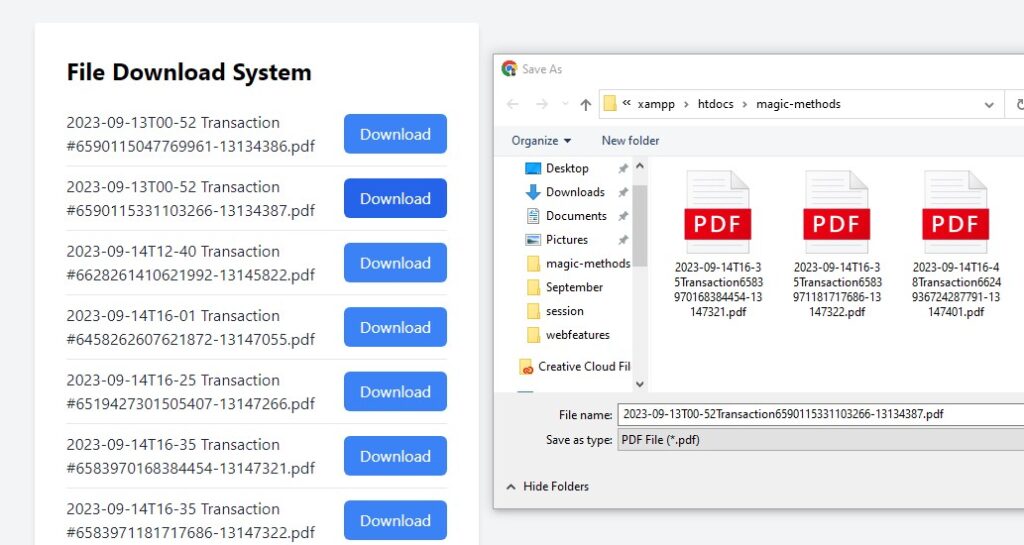
Final Output:
Masud Alam

আমি মাসুদ আলম, বাংলাদেশের ৩৬ তম Zend Certified Engineer । ২০০৯ সালে কম্পিউটার সাইন্স থেকে বেচেলর ডিগ্রী অর্জন করি। দীর্ঘ ১৫ বছর আমি Winux Soft, SSL Wireless, IBCS-PRIMAX, Max Group, Canadian International Development Agency (CIDA), Care Bangladesh, World Vision, Hellen Keller, Amarbebsha Ltd সহ বিভিন্ন দেশি বিদেশী কোম্পানিতে ডেটা সাইন্স, মেশিন লার্নিং, বিগ ডেটা, ওয়েব ডেভেলপমেন্ট এবং সফটওয়্যার ডেভেলপমেন্ট এর উপর বিভিন্ন লিডিং পজিশন এ চাকরি এবং প্রজেক্ট লিড করি। এছাড়াও বাংলাদেশের ১৮৫ জন জেন্ড সার্টিফাইড ইঞ্জিনিয়ার এর মধ্যে ১২০ এরও অধিক ছাত্র আমার হাতে জেন্ড সার্টিফাইড ইঞ্জিনিয়ার হয়েছেন। বর্তমানে w3programmers ট্রেনিং ইনস্টিটিউট এ PHP এর উপর Professional এবং Advance Zend Certified PHP -8.2 Engineering, Laravel Mastering Course with ReactJS, Python Beginning To Advance with Blockchain, Machine Learning and Data Science, Professional WordPress Plugin Development Beginning to Advance কোর্স করাই। আর অবসর সময়ে w3programmers.com এ ওয়েব টেকনোলজি নিয়ে লেখালেখি করি।